
“Where can I download it?”
You answer the comment, close the app, and return later to find the same question under another post. Someone else asks whether the download works on a phone. A third person says the link opens, but they cannot edit the file.
It is tempting to paste the same reply beneath all three comments. But these people may be stuck at different points.
Repeated questions give you something specific to investigate: the distance between what your post explains and what someone needs to do next.
Here is a practical way to respond, using a fictional example of a creator sharing a downloadable content-planning worksheet. The comments and replies below are illustrative, not taken from a real account.
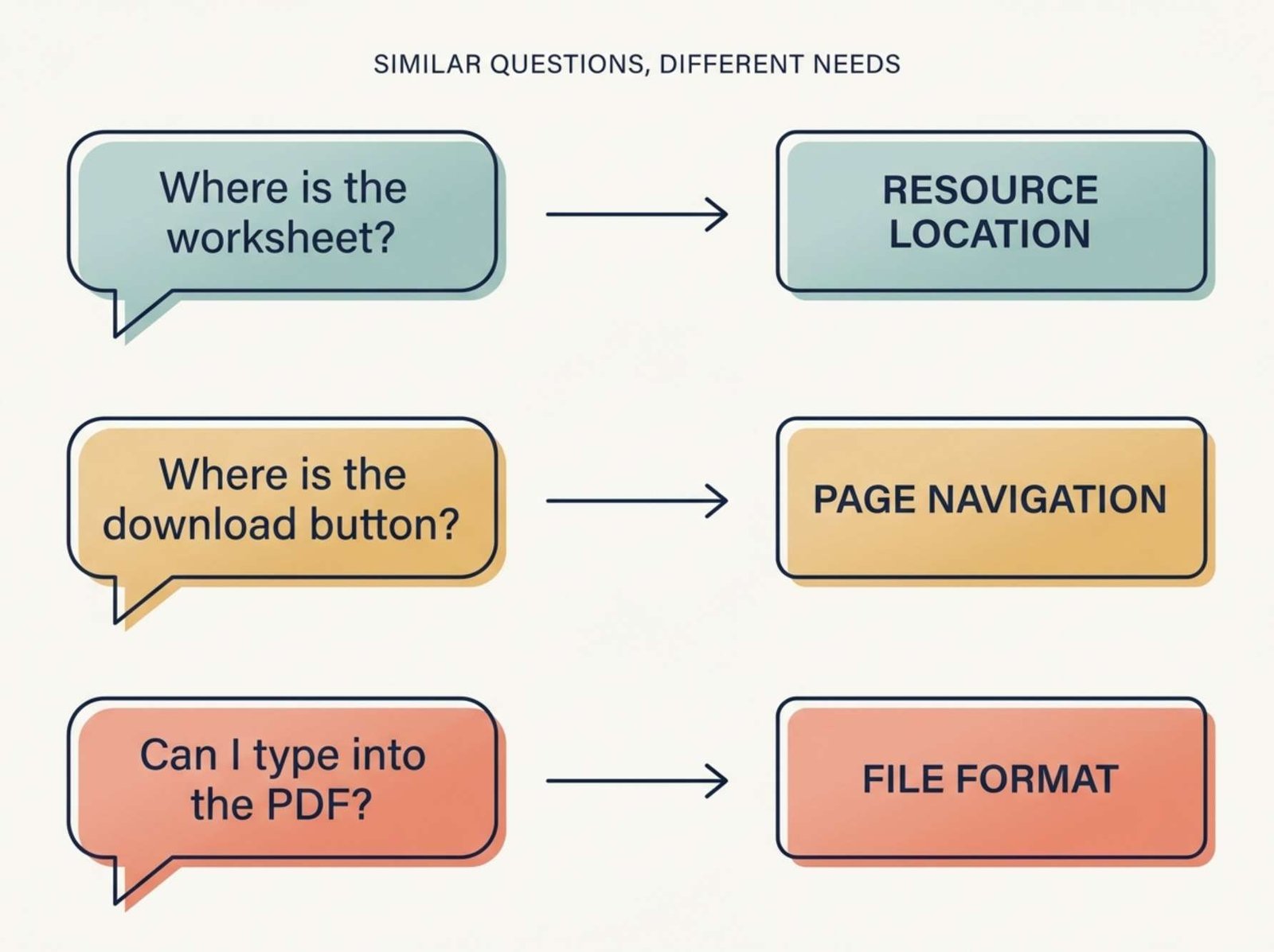
Three Similar Comments, Three Different Problems
Imagine a short social post introducing a worksheet. It explains what the worksheet does, but gives little attention to downloading or using it.
These comments appear:
| Comment | What the person may need |
|---|---|
| “Where is the worksheet?” | A clear route to the download |
| “The page opens, but where is the file?” | Help finding the download on the destination page |
| “I downloaded it, but I can’t type into it.” | An explanation of the file format |
All three concern the same resource. Each needs a different answer.
Before replying, check the actual resource yourself. Follow the route from the published post, open the destination page, and inspect the file. If the question concerns a phone, check that route on a phone where possible.
Do not tell someone to use a button that has been renamed or moved. Do not describe a PDF as fillable until you have verified that it contains working form fields.
For this example, assume the creator confirms that the resource is a printable PDF, the download page has a button labeled “Download PDF,” and no editable version is available.
That verified information becomes the basis for the replies.
Give the Answer Before Sending Someone Elsewhere
A reply such as “Everything is explained on the website” creates another task without resolving the immediate uncertainty.
A more useful response answers the question first:
The worksheet is a printable PDF. It does not have fields for typing. You can print it and fill it in by hand; an editable version is not currently included.
This response gives the person enough information to decide whether the resource suits them.
For the reader who reached the correct page but cannot find the file, the answer changes:
On the worksheet page, look below the preview image for the “Download PDF” button. That opens the file. Are you able to see that button?
The follow-up question identifies the next point of failure. It does not ask the reader to explain everything again.
When a link would help, point to the exact resource where the platform supports it. Avoid sending people to a general homepage and expecting them to search.
Ask for the Smallest Missing Detail
Sometimes there is not enough information to answer responsibly.
“The download doesn’t work” could mean that the page fails to load, the button does nothing, or the downloaded file will not open.
Instead of guessing, narrow the problem:
What happens when you select “Download PDF”: does nothing happen, does an error appear, or does the file download but fail to open?
That question is easier to answer than “Can you provide more details?”
If the device matters, ask whether they are using a phone or computer. Ask for the app or browser only when it will help distinguish the possibilities.
Keep account-specific details out of public comments. For a purchase or login issue, direct the person to your established support channel and explain what information is needed there. Do not ask them to post passwords, payment information, or order details publicly.
Save the Facts You Reuse
A small reply document can save time without making every response identical.
For the fictional worksheet, an entry might contain:
Topic: Worksheet format
Verified fact: Printable PDF; no fillable fields
Basic answer: “The worksheet is designed for printing and completing by hand.”
Boundary: Do not promise an editable version or a release date.
Follow-up: Ask whether the reader needs a printable or digital format.
Recheck when: The downloadable file changes.
The boundary is useful. Without it, a friendly reply can accidentally become a promise:
We’ll release an editable version soon!
If no release is planned, that sentence creates an expectation the creator cannot support.
Before using a saved response, read the full comment and the replies beneath it. A person who has already explained that they downloaded the file should not receive instructions for finding the download.
Adapt the answer to their current situation.
Find Unanswered Questions Without Losing the Conversation
On YouTube, you can review comments through YouTube Studio → Community. The Published and Held tabs separate visible comments from those awaiting review. Filters include questions and response status, which can help you find comments needing attention. Read the surrounding thread before answering; a filter is a way to locate a conversation, not a substitute for understanding it. YouTube’s guide to reviewing and replying to comments
For other platforms, use the comment-management options available to your account, or review the relevant posts individually.
A simple working note can track unresolved questions:
| Question | Next action | Status |
|---|---|---|
| Where is the download? | Clarify the route in the post | Ready to update |
| Why can’t I type in the PDF? | Explain the printable format | Answer verified |
| The file will not open | Ask what happens after downloading | Waiting for details |
Keep the wording factual. “Waiting for details” is more accurate than “Solved” when the reader has not confirmed what happened.
Decide Where the Missing Answer Belongs
Some questions deserve a new publication. Others reveal a small omission that should be fixed in the original material.
For the worksheet example:
- Finding the file: clarify the download instructions.
- Understanding the format: state “printable PDF” beside the download button.
- Learning how to use the worksheet: create a short demonstration.
A new post about finding a hidden button would leave the original problem in place. Improving the button label or nearby instructions addresses the point where the reader gets stuck.
A demonstration serves a different purpose: it shows a process that may be difficult to explain in one comment.
Build a Follow-Up Around One Reader Task
For this example, the follow-up could be:
How to Plan Three Posts with the Printable Worksheet
A compact visual sequence would show:
- The blank worksheet and the words “Printable PDF.”
- One completed row containing a topic, intended reader, and next action.
- Two more completed rows showing different topics.
- Where to obtain the worksheet.
Use a clearly labeled sample plan. Do not present invented entries as a real campaign with measured results.
The caption should explain the format before readers download:
This example uses the printable version of the worksheet. It is designed for writing by hand. The sample entries show how to turn one broad topic into three distinct post ideas.
That caption answers the format question while introducing something new.
If you have only received one question, avoid opening with “Everyone has been asking.” A direct introduction works: “Here is what the worksheet looks like when completed.”
Make the Clarification Easy to Find
On YouTube, you can pin your own explanatory comment beneath a video if your channel has access to advanced features. Open the comment’s menu, select Pin, and confirm. Pinning a different comment replaces the existing pinned comment. Mobile viewers need to expand the comment section to see it, so essential instructions should also appear in the content or description where appropriate. YouTube’s instructions for pinned comments
For the fictional worksheet, a pinned clarification could say:
Worksheet format: this download is a printable PDF, without fillable fields. The download page includes a preview and a “Download PDF” button.
Use it only after confirming that those details match the current resource.
Check What Happens After the Change
After updating the instructions, review new comments during your next normal comment checks.
Look for specific evidence:
- Do readers still ask where the file is?
- Are they surprised that it is printable?
- Do new questions concern using the worksheet instead of finding it?
- Has the demonstration introduced another unclear step?
Fewer questions alone do not prove the change worked; the post may simply have reached fewer people. More useful evidence is a reader confirming that they found the file, or a clearer understanding of the exact step where others remain stuck.
Keep the replies, download page, and follow-up post consistent. When the resource changes, update the saved answer too. That gives the next reader accurate help without making you reconstruct the explanation every time.